Code & Terminal
Delegate coding tasks to an agent with its own file workspace, and run shell commands, right from the conversation.
Delegate coding work, not just calculations
Chalie can hand off a coding task to a focused coding agent that works in its own persistent file workspace — and it can run shell commands directly for anything system-level. Ask it to write and run a script, process a file, or automate a task, and it does the work right in the conversation.
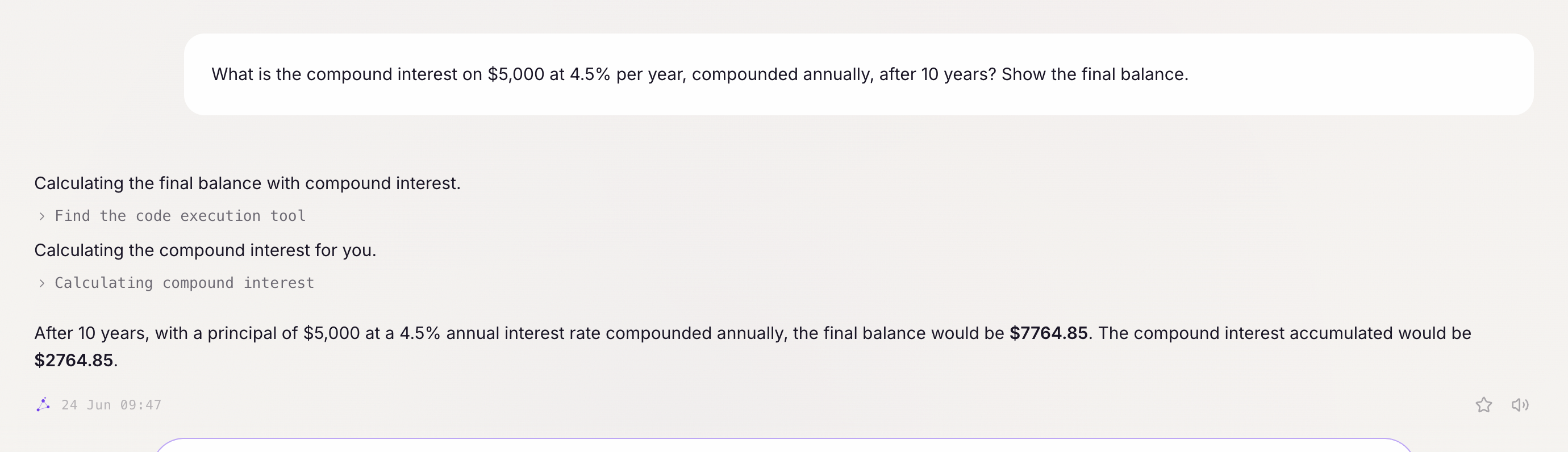
Getting started:
- “Calculate the compound interest on $10,000 at 5% over 10 years.”
- “Write a script that parses this CSV and computes the category totals.”
- “List the 10 largest files in my Downloads folder.”
The coding agent
For anything that needs real code — not a one-line calculation — Chalie delegates to a coding agent. It writes TypeScript, creates, edits, and moves files, and runs what it writes with full permissions — file system, network, everything. There’s no sandbox around it:
- “Write a script that fetches today’s exchange rates and converts this list of prices to GBP.”
- “Create a file with this data and a script that computes the average, min, max, and total.”
- “Build a small tool that validates these JSON files against a schema.”
- “Refactor the function in this file and verify it still works by running it.”
Everything the agent creates lives in one persistent workspace by default, shared across every conversation and every schedule — so a script it writes today can be reused, edited, or rerun later instead of being rewritten from scratch. That’s a default working folder, not a boundary: given a full path, the agent can just as easily read, write, or run a script anywhere else on the machine. That makes it a natural fit for a recurring schedule: “every morning, run the report script and summarize the output” reuses the same script fire after fire.
A single script run is capped at 10 minutes, and very large output is trimmed automatically — Chalie always tells you when that happens rather than silently cutting it. The agent can create files of any kind, but only TypeScript files can actually run.
Every reply from the agent ends with a plain summary of exactly what changed — which scripts were created, edited, moved, or deleted — plus the exact command to run any new one, so you always know what happened without digging through the conversation.
Shell commands
For tasks that need to interact with your system, Chalie can run shell commands:
- “List all running processes sorted by CPU usage.”
- “How much disk space is left on my machine?”
- “Find all files modified in the last 24 hours in ~/Documents/.”
- “Check if port 8080 is in use.”
- “Run my build script at ~/project/build.sh.”
Commands run in your home directory. Chalie classifies each command by risk (read-only, file modification, installation, remote access) and applies your configured policies. Secrets and credentials are filtered from the environment before execution.
Commands have a default timeout of 30 seconds, extendable to 5 minutes for longer-running tasks.
Combining code and conversation
The real power is combining code with conversation:
- “Here are my sales figures for the month — write a script that calculates the growth rate and tells me if we’re on track for the quarter.”
- “Run the test suite and tell me which tests failed.”
- “Parse this CSV and give me a summary of the data.”
Policies
The coding agent and shell commands are governed separately by your configured policies. The coding agent is allowed by default while you’re chatting directly, and denied by default in the background and for external integrations, so an unattended schedule never stalls waiting on an approval nobody’s there to give. Shell commands have their own set of categories (file modification, installation, remote connections, etc.) you can individually require confirmation for or block outright. See the Policies guide for details.